
Your Inbox
The inbox is where everything starts. Not just tasks — thoughts, ideas, voice notes, forwarded emails, scanned documents, anything. If something occurs to you that might matter, it goes here first. No decisions at capture time. Just get it out of your head and into the system.
What the inbox is for
The ADHD brain generates a constant stream of thoughts — obligations remembered mid-conversation, ideas arriving at inconvenient moments, tasks surfacing while you're doing something else entirely. Most systems ask you to decide what something is before you can capture it. ATEND doesn't. The inbox is a pure holding area. Capture now, decide later.
The inbox accumulates everything. You process it separately, on your own schedule — a few times a week, during your Weekly Architecture Session, or whenever you have ten minutes and the mental bandwidth to make good decisions. The capture and the decision are intentionally separated because they require different cognitive states.
Seven ways to get something in
ATEND is designed so that capture is never more than a tap away, regardless of what you're doing or which device you're using.
No decisions at capture time. None of the capture methods ask you to pick a role, assign a priority, or decide what kind of thing this is. That all happens later, during processing. The capture sheet has two buttons — Save and Do — and that's the only choice required. Everything else waits.
Save versus Do
When you capture something in the app, two buttons appear at the bottom of the capture sheet: Save and Do.
The distinction matters. "Pick up a cake at Hansen's Bakery tonight at 6pm" is complete enough for Do — the system can detect the time and create an appointment immediately. "Call the attorney about the filing" is not — too many missing details. Save it, process it properly later, and the processing flow will ask for what's needed.
When in doubt, Save. The inbox will hold it faithfully until you're ready. There's no penalty for using the safe path.
The inbox list
The inbox list shows your unprocessed items in reverse chronological order — most recent at the top. Each item shows its content and a relative timestamp: "3 min ago," "yesterday," "last Thursday." Items captured by email show the subject line and sender. Items captured by voice show a microphone icon alongside the transcript.
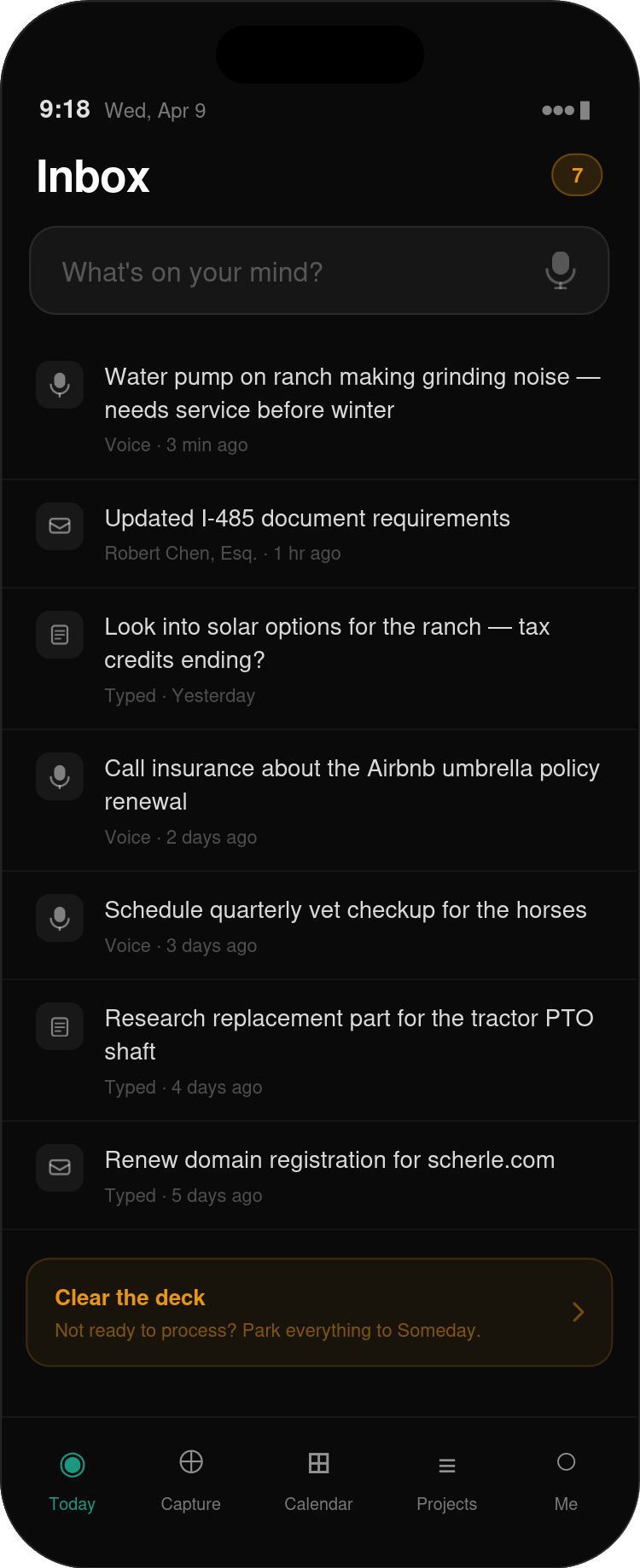
Gestures
Two swipe gestures work on any inbox item. Swipe left opens the processing sheet — the same as tapping the item. Swipe right trashes the item immediately with no processing required. Use the right swipe when something is obviously junk — a captured thought that was already irrelevant by the time you got here.
The inbox badge
The badge on the ATEND app icon and the People tab shows the count of unreviewed items — things that have arrived but haven't been touched yet. Items you've been through during a quick pass (confirmed as real, waiting for full processing) are tracked separately as a quieter indicator: "12 items to process when you're ready." These don't add to the urgent badge.
A growing inbox badge can become a source of stress, particularly if you associate it with falling behind. The badge represents things waiting for a decision — not things you've failed to do. An inbox of 25 items is 25 captured thoughts that are safely stored. That's a good thing. Process them when you're ready, not when the badge makes you feel bad.
What happens when something arrives
When an item enters your inbox — however it got there — it sits in unreviewed status. It's inert. It doesn't affect your task list, your Launchpad, or anything else in the system. It's waiting.
Email forwarded items and document scans begin background processing immediately: attachments are extracted, OCR runs on PDFs and images, and if the email looks like an action item the system quietly suggests a normalized task title. None of this requires your attention — it's just making the item easier to process when you get to it.
Voice captures are transcribed immediately. If the transcription confidence is below the system threshold — a noisy environment, a fast talker, an unusual word — the item is flagged with a small indicator: "We weren't sure we caught that right — check this one." The original audio is always retained alongside the transcript.
Nothing is lost. Nothing expires. Items sit in the inbox until you decide what to do with them.
A habit worth building
The inbox works best as a capture-now, process-later system. The capture half requires almost nothing — a tap, a few words, a voice note. The processing half requires real cognitive engagement, and that's why they're separated.
Most people who use ATEND find that two or three short processing sessions a week is enough. The Weekly Architecture Session always includes an inbox-to-zero step as one of its five components — so even if you never open your inbox between sessions, it will get cleared once a week at minimum.
The capture habit — the reflex to externalize a thought the moment it arrives — is the thing worth practicing. Everything else in ATEND depends on the inbox being fed. The more reliably you capture, the more reliably the system can do its job.
In the next chapter, we'll walk through the processing flow — what happens when you sit down with your inbox and start making decisions.