
Your Morning Setup
Before the Launchpad opens each day, ATEND asks you three quick questions. The whole thing takes about two minutes. What it does with your answers shapes everything about how your day unfolds.
When it runs
The morning setup runs automatically the first time you open ATEND each workday, at or after the start of your configured workday hours — the default is 8:00 AM. It only runs once per day. If you've already completed it and come back to the app later, you go straight to the Launchpad.
If you open ATEND before your workday hours begin — checking your inbox late at night, capturing a thought early in the morning — you'll see the late capture screen instead. The morning setup waits until the day has actually started.
You can dismiss the morning setup and go straight to the Launchpad. The system will use a default energy level of Medium and carry forward yesterday's MIT if it wasn't completed. The setup is useful, but it's not a gate — nothing breaks if you skip it on a rushed morning.
The three screens
Screen 1 — Your energy level
The first screen is a single question: "How's your energy right now?" A slider runs from Fragmented on the left through Low, Medium, and High on the right. Drag it to where you are and the system responds immediately — showing a brief confirmation of what that selection means for your day. Then tap "Let's go."
This is the most important input in the entire setup, and probably the most counterintuitive one. Most productivity systems ask what you need to do. ATEND starts by asking who you are right now — because the right task depends entirely on who's doing it.
A 90-minute deep writing session is not the same task for someone at peak energy as it is for someone running on four hours of sleep. The words are the same. The person is different. The system needs to know which person it's working with today.
Your energy selection persists for the whole day. If your state changes mid-day — a bad meeting drains you, or an afternoon coffee kicks in — you can update it at any time by tapping the energy indicator in the Launchpad header. The Now list recalculates immediately.
The energy check only works if you answer honestly. There's a strong temptation to select High regardless of how you actually feel — it seems like the aspirational choice. Resist it. The system isn't judging you. It's trying to match tasks to the person who's actually going to do them today. A Low energy day that's used well is better than a High energy selection that produces paralysis.
Screen 2 — Confirming your MIT
The second screen shows your Most Important Task for today.
If you set tomorrow's MIT during last night's Daily Close, that task is waiting here. The system shows it prominently with a brief rationale: why it was selected, which weekly outcome it's connected to, and how long it's estimated to take.
If no MIT was set last night — if you skipped the Daily Close, or if this is your first day using ATEND — the system suggests one based on your Big Three outcomes for the week, anything overdue, and what it knows about your calendar today.
Confirming
One tap to confirm. The MIT is set. You'll see it on the Launchpad for the rest of the day. The decision is made. You don't have to think about it again until you start working on it.
Swapping
If the suggested MIT isn't right — if something more urgent has come up overnight, or if the suggestion doesn't match what you know about today — you can swap it. Up to five alternatives are shown below the primary suggestion, filtered by your current energy level. Tap any of them to make it your MIT instead.
The best MIT is specific, completable in one focused session, and connected to something that genuinely matters this week. "Work on the book" is a poor MIT — too vague to start. "Write the opening scene of Chapter 4" is a good one. If the suggested MIT feels vague or unclear, swap it or edit it before confirming. A clear MIT is worth the extra thirty seconds it takes to get right.
Screen 3 — What will you start with?
The final screen asks one question: "What will you start with?" It shows three tasks, filtered by your energy context and time available before your first calendar commitment.
These aren't random. They're drawn from the same fit score logic that drives the Launchpad — the three tasks that best match who you are right now. A High energy morning surfaces deep work. A Fragmented day surfaces tasks that can be knocked out quickly and completely.
Tap the one you'll begin with. The system pre-assigns it as your first time block of the day. When the morning setup closes and the Launchpad opens, that task is already in position — you don't have to decide what to do first. You already did.
This screen is the bridge between planning and doing. By the time it closes, you have an MIT for the day, a first task already chosen, and a Launchpad filtered to match your actual state. The day doesn't start from a blank slate. It starts from a decision already made.
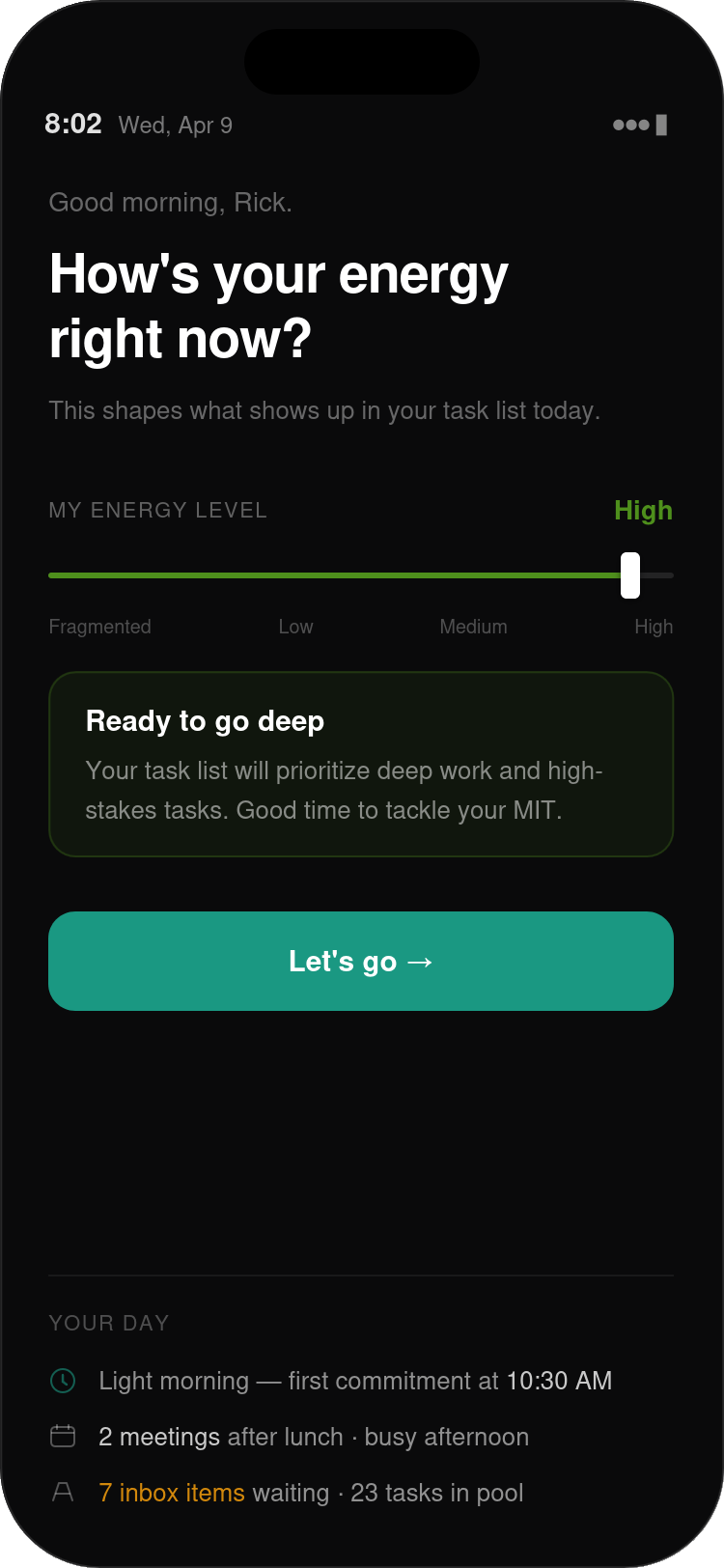
FIG. 4.1 — Screen 1 of the morning setup. A personalized greeting, the energy question, and a slider running from Fragmented through Low, Medium, to High. High is selected — the green confirmation card reads "Ready to go deep" with a brief explanation of what that means for your task list. The "Your Day" summary at the bottom shows the day's shape at a glance before you commit to anything.
What the system does with your answers
Your energy selection, MIT confirmation, and first task choice aren't stored as data points and forgotten. They actively shape everything you see for the rest of the day.
Energy feeds directly into the fit score algorithm — the system that decides which tasks appear in your Now list and in what order. A High energy selection boosts deep work tasks and suppresses quick admin. A Low selection does the reverse. A Fragmented day surfaces tasks that can be completed in under fifteen minutes without requiring context ramp-up. Every time the Launchpad recalculates — which happens automatically throughout the day as time passes and tasks are completed — your energy setting is one of the primary inputs.
Your MIT sits at the top of the Launchpad all day, separate from the Now list, in its own banner. It doesn't compete with other tasks for position — it's always there, always first, always visible. The system is not going to let you forget what you said mattered most today.
The whole setup takes about two minutes on a focused morning. Less, once you know what you're doing. That's a reasonable price for a day that starts with direction rather than a blank slate.
In the next chapter, we'll look at the Launchpad itself — what you see when the morning setup closes and the day begins.